Reverse charge per invoice line
Reverse-charged work for a contractor and a normal job with VAT sit in the same books. You choose per line: reverse-charged turnover goes to box 1e, the rest to the box of its rate.
For freelancers in construction
Reverse-charged invoices to your contractor, normal VAT for a private client and the VAT on your materials back — in accounting software you read in your own language: English, Dutch, Polish, Hungarian or Romanian.
90 days free · no payment method needed · cancel monthly afterwards
Already have an accountant? They work along in your books at no extra cost. How that works
Are you a bookkeeper with clients of your own? For accounting firms
Software that can choose per invoice line between normal VAT and 'btw verlegd', puts reverse-charged turnover in box 1e of the VAT return and books reverse-charged VAT on your own purchases in box 2a. In the booxx accounting software you choose the VAT code 'BTW verlegd' on the invoice line: the invoice then shows no VAT amount but the statement 'Btw verlegd' and your contractor's VAT number, and without that number the software won't send the invoice. If you hire a subcontractor yourself, booxx recognises 'btw verlegd' on their invoice and suggests the right VAT code; when you book it, that VAT goes in box 2a and in as input VAT, so on balance you pay nothing (unless you use the KOR). Every user picks their own language: English, Dutch, Polish, Hungarian or Romanian.
Two kinds of work side by side
| Subcontracting for a contractor | Job for a private client | |
|---|---|---|
| VAT on your invoice | No VAT amount, but 'btw verlegd' | VAT at the applicable rate |
| Your customer's VAT number on the invoice | Required | Not applicable |
| Who declares the VAT | Your contractor, in box 2a | You |
| Your turnover on the VAT return | Box 1e | Box 1a (standard rate) or 1b (reduced rate) |
| VAT code on the invoice line | BTW verlegd | The code for the rate |
Reverse-charged work for a contractor and a normal job with VAT sit in the same books. You choose per line: reverse-charged turnover goes to box 1e, the rest to the box of its rate.
If you choose 'BTW verlegd' and your contractor's VAT number isn't on the customer record, the invoice stays a draft and you get a message with a link to that customer. That way no reverse-charged invoice goes out without the number.
When a subcontractor shifts the VAT to you, booxx recognises it on their invoice and suggests the code 'BTW verlegd naar jou'. When you book it, the VAT goes in box 2a and at the same time in as input VAT, so you don't forget to declare it and you don't deduct it twice.
You forward purchase invoices by email and photograph receipts from the builders' merchant; the software reads them and suggests the ledger account and VAT code. If most of what you invoice is reverse-charged, your return usually shows money coming back.
You use the software in English, Dutch, Polish, Hungarian or Romanian. The bookkeeping stays Dutch, with the boxes of the Dutch Belastingdienst; the invoice goes to your contractor in the language you set for them.
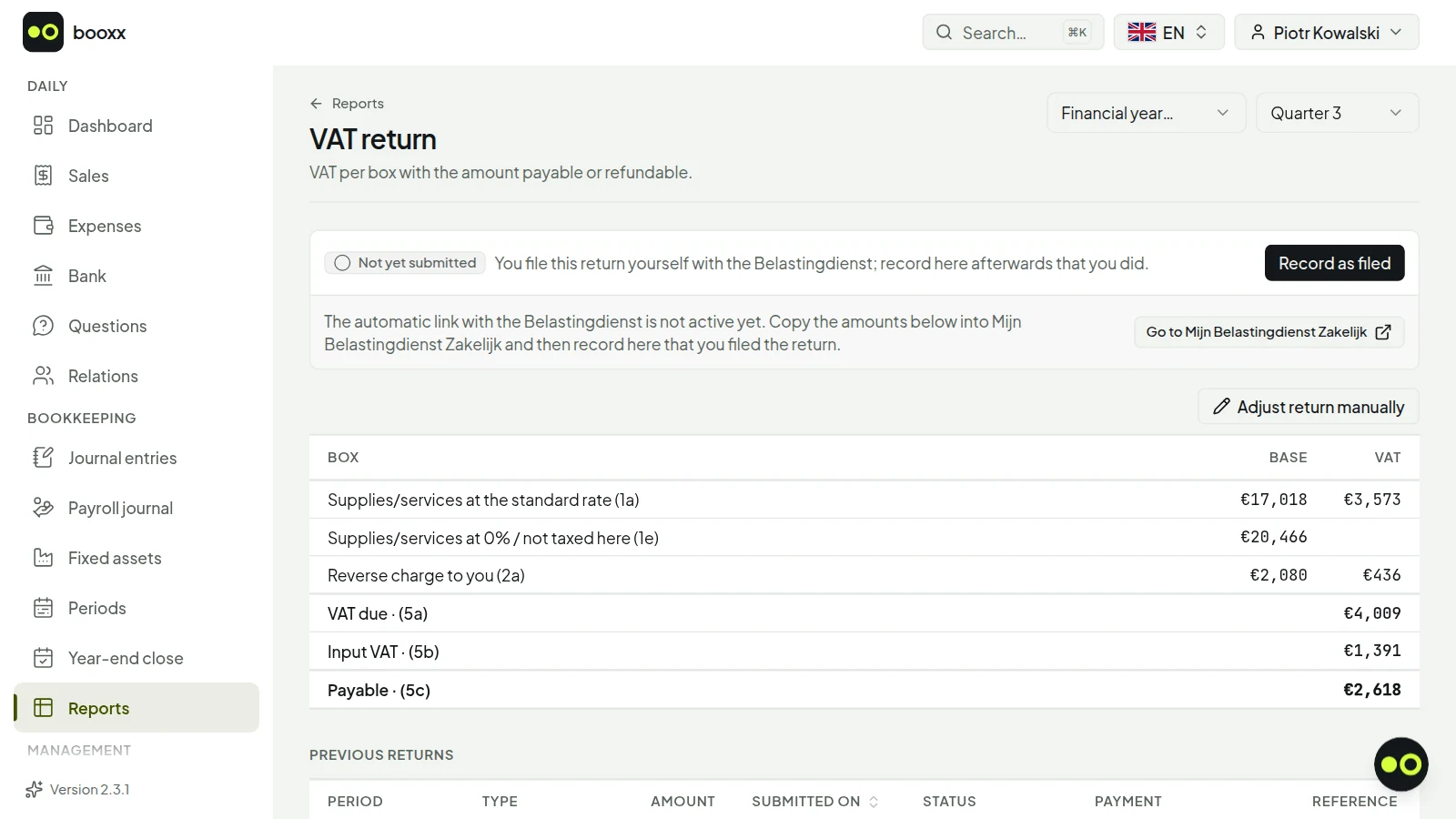
At the end of the period the VAT return is ready: your reverse-charged turnover in 1e, reverse-charged purchases in 2a and your input VAT in 5b, with a click-through per box to the entries behind it.
There are no quotes, time tracking or job costing per project: it is accounting software, not construction planning. Whether a job falls under the reverse-charge scheme is not something the software decides for you; you choose the VAT code yourself, and if in doubt you check with your accountant or the Dutch Belastingdienst before you invoice. The VAT return is ready, but you file it yourself, in Mijn Belastingdienst Zakelijk. And the automatic bank connection is in development: for now you import bank statements as MT940 or CAMT files.
Yes. Every user picks their own language: English, Dutch, Polish, Hungarian or Romanian. The bookkeeping stays Dutch, with the Dutch chart of accounts and the boxes of the Dutch Belastingdienst, but you read and operate everything in your own language. The invoice goes to your contractor in the language you set for them.
Then booxx won't send the reverse-charged invoice. It stays a draft and you get a message with a link to the customer; fill in the VAT number there and send again. If the number is missing and it is therefore unclear who your customer is, the Dutch Belastingdienst can still assess the VAT on you.
You email or upload the invoice like any purchase invoice. If it says 'btw verlegd' and the supplier has a Dutch VAT number, booxx suggests the code 'BTW verlegd naar jou', and when you book it the VAT goes in box 2a and in as input VAT. On balance you pay nothing (unless you use the KOR), but the invoice does appear on your return. If the code is wrong, you choose another one before booking.
Usually, yes. You don't charge VAT yourself, but you do pay it on materials, tools and your van, and that VAT you deduct as input VAT. So you still need to file your VAT return. If you join the small business scheme (KOR), you usually no longer file a VAT return, and you no longer get VAT back either.
Yes. You invite them for free with the Bookkeeper role; they work in the same books, in their own language, and can check the VAT return for you. You file it yourself in Mijn Belastingdienst Zakelijk, or they do it through their own filing channel.
Reverse charge (btw verlegd)Invoice requirementsVAT returnWorking with your accountantPricing
booxx.nlYour books, in your own language
Create a set of books, send your first invoice and see whether it works for you. The first 90 days are free and no payment method is asked for, so there is nothing to cancel later.
90 days free · no payment method needed · cancel monthly afterwards