For bookkeepers
Your client invited you. Here's how it works.
With the Bookkeeper role you work in your client's books with your own login: bookings, the ledger, the VAT return and questions to your client. It costs you and your client nothing extra, and you don't need a subscription of your own.
Do you run your clients' books as an accounting firm? Your firm pays from €9 per managed administration per month, excluding VAT, with no fixed firm fee. For accounting firms
How do you work as a bookkeeper in your client's books?
Your client invites you in booxx under Team, with the Bookkeeper role. If you don't have an account yet, you set a password through the email; if you already have one, this client is added to it. You pick the client in the client switcher at the top and then work in their books: booking, managing the ledger, preparing the VAT return, putting periods up for review and viewing the activity log. Everyone picks their own language: you Dutch, for example, your client Polish, on the same figures.
From invitation to first booking
- You get an emailYour client invites you under Team, with the Bookkeeper role.
- You log inNo account yet: you set a password through the email. Already have one: the client is added.
- You pick your languageWith the language switcher at the top right (the flag) you choose your own language; it applies only to you and is remembered.
- You pick the clientIn the client switcher at the top.
- You get to workBooking, asking your client a question, preparing the VAT return.
Who does what in your client's books
| You, the bookkeeper | Your client, the owner | |
|---|---|---|
| Bookings and the ledger | Yes | Yes, if they want to |
| Preparing the VAT return | Yes | Yes |
| Questions about bank transactions | Asks them and closes them | Answers them, and can ask a question too |
| Team and subscription | No | Yes |
| Sending payments | No | Yes |
| Screen language | Own choice, for example Dutch | Own choice, for example Polish |
| Cost | No subscription of your own needed | Own subscription; the Bookkeeper role costs nothing extra |
| Ending access | Give up access, on the My clients page | Withdraw access, under Team |
A question to your client, on their own screen
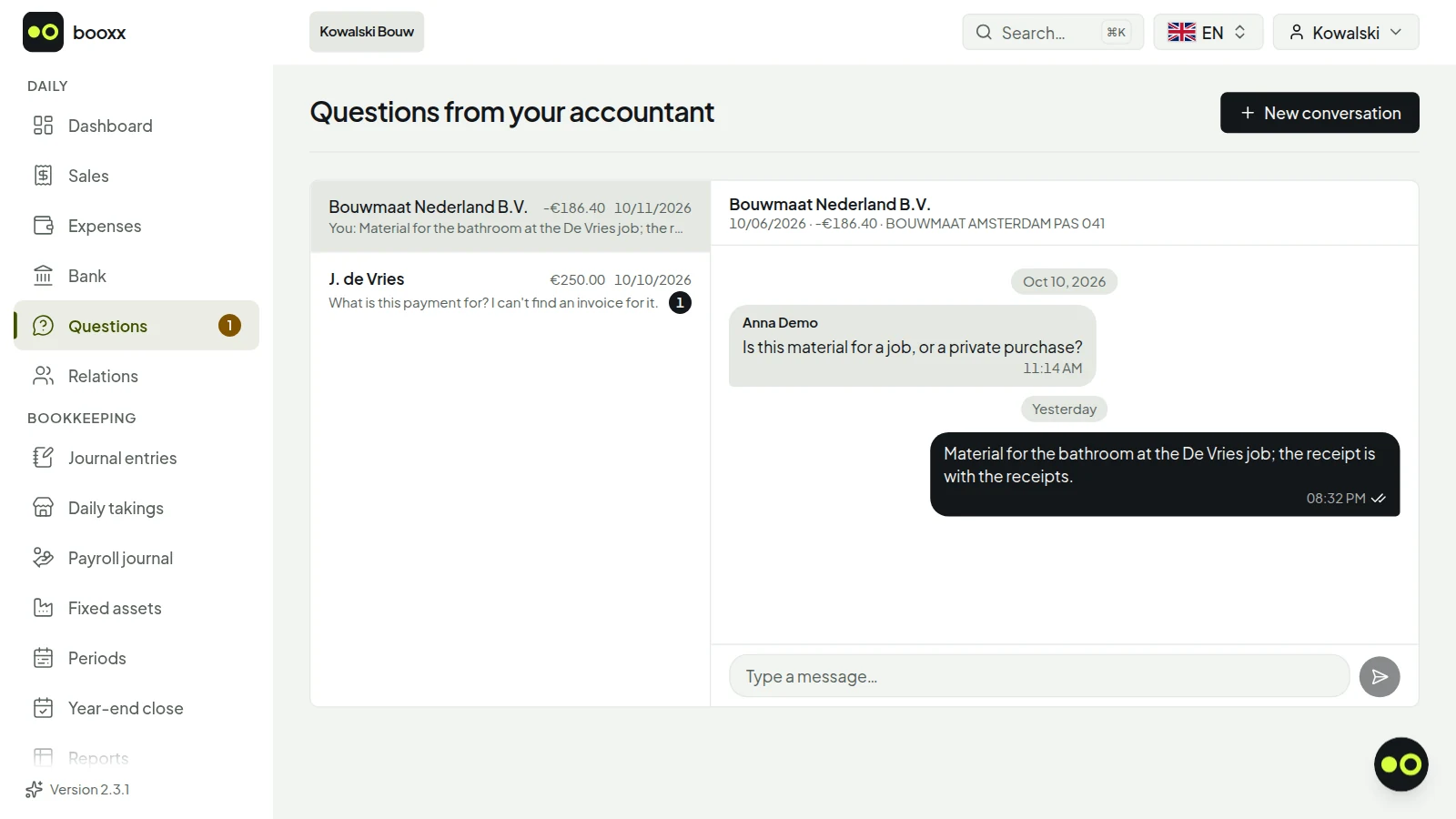
If you can't place a bank transaction, you start a conversation about it under Questions for your client. A question without a transaction works too. Your client sees it on their dashboard and in the menu, with the screen in their own language, and answers in the same conversation. If there is already a conversation about that transaction, your message goes into it. Once everything is clear, you close the conversation.
Do you work in a different package yourself?
Then you don't have to switch to get the figures. Under Reports you download the audit file (XAF) for a financial year: the complete journal in the standard format for Dutch books, as XAF 4.0 or 3.2. Whether your own package reads that file in differs per package. For the income tax or corporate income tax return there is the Tax software export, an RGS bridge statement for Nextens, Avanzer Aangifte or Fiscaal-online.nl.
What a package does with an audit file from another package, according to its own help pages:
| SnelStart | According to its own knowledge base, it does not read in another package's export (or an .xaf audit file) and names an external service that can. Importing entries does work, from an Excel file. |
|---|---|
| Moneybird | Does not mention the audit file. According to the help centre, importing existing books in one go is not possible: you start with an opening balance or enter old data retroactively. |
| Nmbrs Accounting (formerly Yuki) | Reads in historical data from before the start date from the XAF audit file (version 3.0 onward) of almost any accounting package. |
| AFAS SB | Reads in an audit file (XAF 3.2 or 4.0) when a new administration is started and names Profit, Twinfield, Exact Online, Multivers and SnelStart for that; according to AFAS other packages will follow later. It reads in comparative figures from any package that exports XAF 3.2. |
| Caseware Cloud | Reads in XAF 3.1 or 3.2, so choose XAF 3.2 when you download. |
More clients in booxx?
Every client who invites you is added to the same login. If you keep the books for more clients, a firm environment is often handier: one worklist across all your clients, sorted by what is urgent, with your own team and permissions per employee. On the My clients page the link appears as soon as you have two or more clients.
Frequently asked questions from bookkeepers
Can I work in my client's books without a subscription of my own?
No. You don't need a subscription of your own. Your client pays their own subscription, and the Bookkeeper role costs them nothing extra; they can also invite more than one.
Can I work in Dutch while my client uses Polish, Hungarian or Romanian?
Yes. Every user picks their own language out of five: Dutch, English, Polish, Hungarian or Romanian. You book in Dutch, your client sees the same books in their own language, including the names of the ledger accounts. You choose your own language with the language switcher at the top right; that choice applies only to you and is remembered.
How do I switch between my clients?
In the client switcher at the top. Every client who invites you is added to the same login. If you already have an account for your own books, the client is added there too.
Can I file the VAT return from booxx?
The return is ready with the boxes of the Dutch tax office (Belastingdienst). Filing still happens outside the package for now: in your client's Mijn Belastingdienst Zakelijk, or through your own filing channel. Then you choose Record as filed in booxx, so the return doesn't stay open.
How do I end the collaboration?
On the My clients page, choose Give up access for that client. Your client can also withdraw your access themselves under Team. Both take effect immediately, and your own account stays.
What does a firm environment cost?
From €9 per managed administration per month, excluding VAT. In a firm environment your firm creates the client and your firm pays for that administration, not the client. The rate per administration goes down the more you run; the lowest rate applies to large firms. There is no fixed firm fee and no price per staff member. If a client with their own subscription invites you as Bookkeeper, you pay nothing.
Working with your accountantIn your languageDutch chart of accounts in EnglishStarting a bookkeeping practiceWorking in the firm workspaceWorking with your bookkeeping firm
booxx.nlYour books, in your own language
Running more clients? Work from a firm environment.
Want to see how the package handles the books first? Start a trial with your own firm's administration. You then see the package the way your client sees it; for the firm environment with the worklist, send us an email.
90 days free · no payment method needed · cancel monthly afterwards
From €9 per managed administration per month, excluding VAT. No fixed firm fee, no price per staff member.